Pass-ta-key Golden Attack: Extracting the Security Domain Secret from Chrome process memory
Part 1 of a technical deep-dive into the Pass-ta-key Golden Attack, covering a new method for extracting the Security Domain Secret (SDS) of Google Password Manager from Chrome process memory.

Disclaimer: This article is intended for information security research and educational purposes only. The techniques presented must be used exclusively on systems that you own or for which you have explicit authorization.
Introduction
Passkeys are presented as the future of authentication. By replacing passwords with a cryptographic key pair, they promise to eliminate phishing and credential theft. Paradoxically, this robustness becomes a vector for total compromise in the hands of an attacker. With a stolen password, MFA remains a last line of defense. With a passkey private key, there is nothing left to bypass: the key is the authentication factor. No MFA, no SMS code, no push notification, the generated WebAuthn assertion is cryptographically valid and indistinguishable from a legitimate authentication.
Google Password Manager (GPM) adopts this model for its synced passkeys, compatible with many services like Amazon, Apple, Microsoft, Binance, GitHub… Synchronization between devices is ensured by the Cloud Authenticator. This model introduces an attack surface that can lead to an Account Takeover (ATO) attack.
In August 2026, Unit 42 (Palo Alto Networks) published an analysis demonstrating that passkey synchronization between devices creates an unexpected attack surface. Their work identifies how malware present on a compromised workstation can hijack the authentication flow to take control of accounts protected by GPM passkeys. This scenario is common to the three types of Pass-ta-key attacks, in increasing order of criticality.
1. Google Password Manager Architecture
To understand the attack, one must first know how Google Password Manager manages passkeys. Unlike a strictly device-bound model where the private key never leaves the device, GPM adopts a synchronization model via a Cloud Authenticator.
1.1 The Cloud Authenticator: enclave.ua5v.com
On each connection with a GPM passkey from Chrome, the browser establishes a WebSocket connection to enclave.ua5v.com. This service acts as a cloud authenticator, also called an enclave. It generates passkey keys, manages authentication requests, and maintains credential synchronization across all of the user’s devices.
During onboarding, Chrome generates a TPM-bound key pair and records this state in passkey_enclave_state. This file notably contains two distinct elements: the device identity key wrapped_identity_private_key, encrypted by the TPM and decryptable locally, and the wrapped SDS wrapped_security_domain_secrets, protected by a wrapping key managed by the Cloud Authenticator. Only the latter can decrypt the SDS.
Under normal circumstances, the device authenticates to the Cloud Authenticator with its TPM identity key, and the SDS never transits on the client side. To trigger an onboarding, simply delete passkey_enclave_state; Chrome then retrieves the SDS in plaintext from Google’s Trusted Vault, before contacting the Cloud Authenticator.
1.2 The security domain
The security domain is the set of devices authorized to use a user’s GPM passkeys. It is not a server, but a logical construct: it defines which devices can access synced passkeys and under what conditions.
Each device joins this domain during onboarding, authenticating to the Cloud Authenticator. Once a member, it can participate in cryptographic operations and access the account’s passkeys. The domain is materialized locally by the passkey_enclave_state file, which contains the device identity key and the domain state.
Deleting this file removes the device from the domain from Chrome’s perspective. The browser must then rejoin the domain, which triggers the retrieval of the SDS in plaintext on the client side.
1.3 The Trusted Vault
The Trusted Vault is a Google service distinct from the Cloud Authenticator. Its role is to store and provide encryption keys, including the SDS. It performs no cryptographic operations but retains the keys and makes them available to authorized services.
The Cloud Authenticator is one of these services. When it needs the SDS for an operation, it retrieves it from the Trusted Vault. Chrome does the same during an onboarding: it contacts the Cloud Authenticator to join the security domain. It is the Cloud Authenticator that retrieves the SDS from the Trusted Vault and provides it to Chrome.
1.4 The Security Domain Secret
The Security Domain Secret (SDS) is a 32-byte master key that encrypts all passkeys synced via GPM. It is never stored in plaintext on disk. It is the wrapped_security_domain_secret that is stored in the local identity file, in the form of a protobuf map: map<int32, bytes> wrapped_security_domain_secrets = 10;
The key of this map is the SDS version, and the value is the wrapped SDS. Only the Cloud Authenticator can decrypt it during a retrieval, via a wrapping key managed by Google’s Trusted Vault.
1.5 Local storage: WebauthnCredentialSpecifics
On disk, Chrome stores GPM synced passkeys in its sync folder:
1
%LocalAppData%\Google\Chrome\User Data\<Profile>\Sync Data\LevelDB
These records are encoded in protobuf under the WebauthnCredentialSpecifics format. Each record contains the linked site (rp_id), the username, the user identifier (User ID corresponding to the WebAuthn userHandle), and an Encrypted field: the passkey’s ECDSA private key, encrypted as a blob with the SDS.
Access to these records does not require elevated privileges. Malware running with standard user rights can exfiltrate the necessary folder.
2. The Pass-ta-key attack family
Unit 42 describes three categories of attacks, grouped under the name Pass-ta-key. Each exploits a different security assumption.
2.1 Pass-ta-key (base level)
The most direct attack consists of impersonating the device. The malware extracts the device identity key from the passkey_enclave_state file or Chrome memory. It then uses Windows CNG APIs to sign requests to the Cloud Authenticator without user interaction, without privilege escalation, and without unlocking the device.
The attacker then authenticates to the Relying Party (RP) via a valid assertion. However, this assertion lacks the User Verified (UV) flag. Any service that verifies this flag will reject the authentication.
2.2 Silver Pass-ta-key
This attack exploits the onboarding process. The attacker invalidates the existing UV key by deleting passkey_enclave_state, forcing Chrome to onboard the device again. During the uv_key_pending transitional state, the attacker registers a UV key that they control via the device/add_uv_key command. The Cloud Authenticator does not validate the attestation of new UV keys, which allows the attacker to generate assertions with the UV=1 bit.
This attack offers long-term persistence: even if the victim changes their password or revokes sessions, the attacker maintains permanent access via their fraudulent UV key.
2.3 Golden Pass-ta-key
This is the most critical attack, and it is the one we will focus on in this article. It allows extracting all synced passkeys in a directly exploitable form.
The vector is the Security Domain Secret. As explained, the SDS is a 32-byte master key that encrypts all GPM passkeys. It is briefly handed to Chrome by the Trusted Vault during device onboarding to the security domain, and remains in plaintext in memory for a few moments. Malware that triggers an onboarding can therefore exfiltrate the SDS. For their part, the attacker decrypts the ECDSA private keys of all passkeys of the Google account, then signs valid WebAuthn assertions themselves for each of the concerned services. The account is then compromised offline: no need for the TPM, no need for the victim’s device, no need for interaction. Each extracted private key is enough to produce a signature accepted by the corresponding RP.
Unlike a compromised password, the SDS cannot be revoked in Google’s current implementation, it is permanent and definitive.
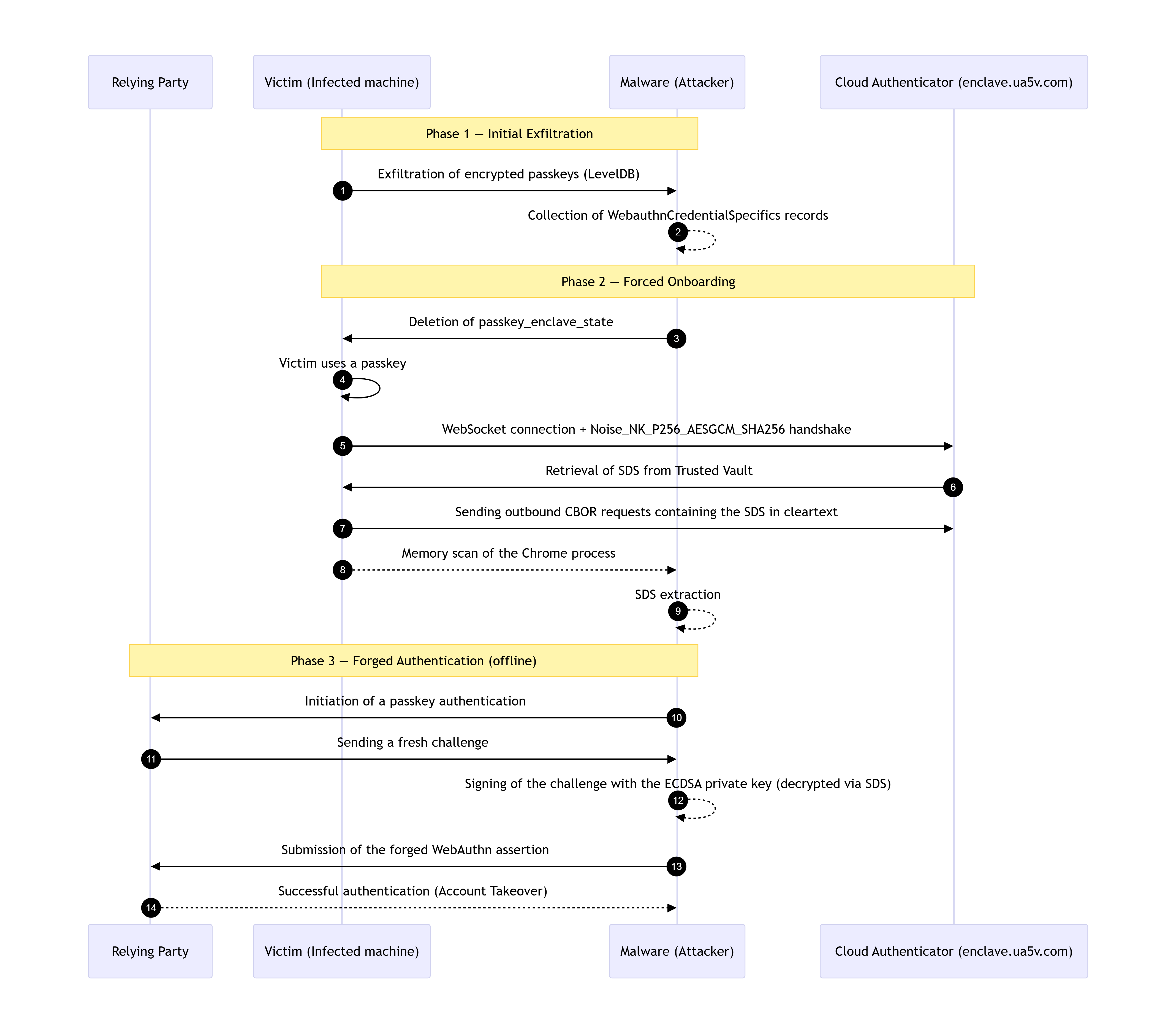 Figure 1: Golden Pass-ta-key attack overview.
3. First known variant of the attack: SDS leak in Chrome logs
The first documented leak of the SDS was trivial. During device onboarding, Chrome wrote the SDS in plaintext to Chrome logs, accessible via chrome://device-log. The SDS was present across multiple logged FIDO events in the secret field. For instance, it was directly exposed in the SDS wrapping request, which appeared in the logs in the following form:
1
{"cmd": "keys/wrap", "secret": "h'<Security domain secret>'", "purpose": "security domain secret"}
The SDS transited through Chrome debug logs via FIDO events and was transcribed into memory.
Because these logs were stored in the Device Event Log component acting as a FIFO (First In, First Out) ring buffer, they were retained in memory as long as they were among the last 4000 log events. These entries were only evicted when overwritten by newer events. The SDS therefore remained in plaintext in the Chrome process memory indefinitely, making it trivially capturable by a simple memory scan.
Google fixed this leak after an initial report (CVE-2025-12910), by redacting the secret field of the logs. A second report, published by the Unit 42 researcher, signals exactly the same vulnerability as the first, but reveals that a new key field of the wrapping request still contained the SDS in plaintext. It was only after this second fix that both fields were masked. The corresponding patch, visible in the Chromium source code, adds assertions to verify that sensitive fields are properly redacted:
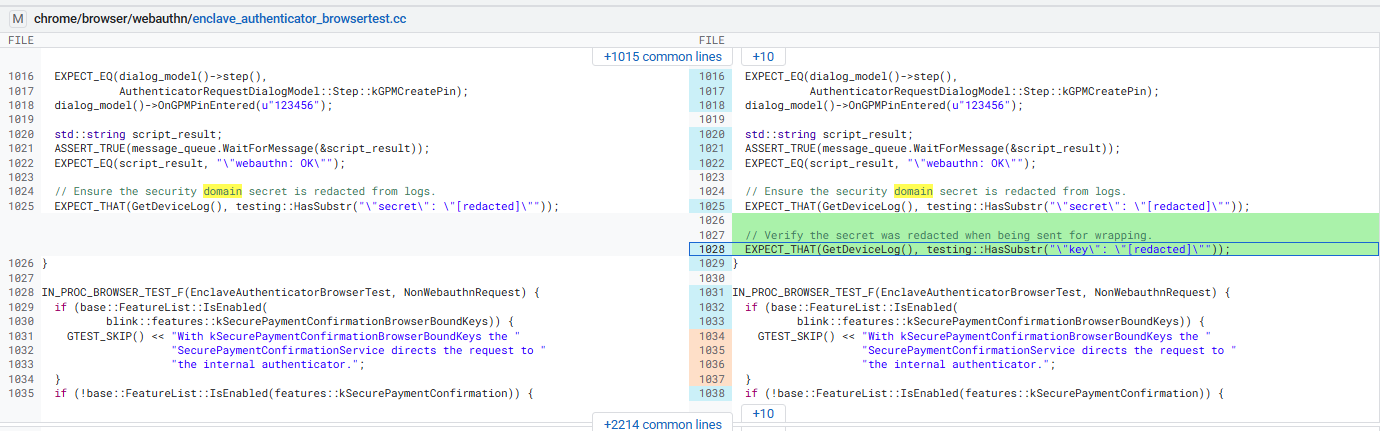 Figure 2: Chromium patch (‘key’ field redaction).
The resulting debug logs now explicitly show the key field as [redacted]:
 Figure 3: FIDO event in Chrome debug logs showing the ‘key’ field redacted
This gives in memory:
 Figure 4: Chrome memory log (‘key’ field redacted).
After this fix, this variant is no longer exploitable. The SDS no longer appears in the logs, and a simple memory dump/scan is no longer enough to retrieve it through this path.
But the fix only addresses a display issue. It does not touch the core: the SDS must still be present in plaintext somewhere in the Chrome process for the protocol to work. It is on this observation that we identified a second, more severe variant.
4. Second variant: in-process leak of the SDS during the protocol itself
This variant has no connection to the first. It does not exploit an ancillary component like diagnostic logs, but the mechanism itself: the construction of CBOR requests sent to the Cloud Authenticator.
To use the SDS, Chrome must necessarily have it in plaintext in memory at the time of constructing these requests. This is not an implementation choice, it is a cryptographic constraint: an encryption key must be available in plaintext to be used. As long as the construction of wrapping, assertion, and passkey creation requests is done on the client side, the SDS will transit in plaintext in the Chrome process memory.
Let’s take the example of the wrapping request, which is used during onboarding with the Cloud Authenticator, here is the function that constructs it:
1
2
3
4
5
6
7
8
9
10
11
12
13
14
15
16
// https://source.chromium.org/chromium/chromium/src/+/main:chrome/browser/webauthn/enclave_manager.cc
// Build an enclave request to wrap the given security domain secrets.
cbor::Value BuildWrappingMessage(
    const base::flat_map<int32_t, std::vector<uint8_t>>
        new_security_domain_secrets) {
  cbor::Value::ArrayValue requests;
  for (const auto& it : new_security_domain_secrets) {
    cbor::Value::MapValue request;
    request.emplace(enclave::kRequestCommandKey, enclave::kWrapKeyCommandName);
    request.emplace(enclave::kWrappingPurpose,
                     enclave::kKeyPurposeSecurityDomainSecret);
    request.emplace(enclave::kWrappingKeyToWrap, it.second);
    requests.emplace_back(cbor::Value(std::move(request)));
  }
  return cbor::Value(std::move(requests));
}
This CBOR request corresponds to the equivalent JSON representation observed in memory:
1
{"cmd": "keys/wrap", "key": "<Security domain secret>", "purpose": "security domain secret"}
This variant is more critical than the previous one for three reasons:
- It does not depend on any external component. The logs fix does not affect it.
- It is structurally inevitable: the SDS must be available in plaintext to be used. It cannot be masked without changing the entire architecture.
- It is more difficult to fix than a simple filter on chrome logs.
The difficulty here is temporal. The SDS only remains in memory for a few hundred milliseconds during the construction of requests. It must therefore be captured at the right moment, which makes extraction non-trivial but not impossible.
To highlight this, we proceeded in two steps: first a dynamic reverse engineering analysis to understand where and when the SDS appears in memory in order to extract it, then, from that, build a general extraction method based on the identified CBOR patterns.
5. SDS extraction via dynamic analysis
The objective of this analysis is to find the SDS in plaintext in the Chrome process memory. This step is essential to understand how it is handled and, ultimately, to analyze it in memory to extract it without knowing its value in advance.
The analysis is performed with WinDbg and official Chromium debugging symbols.
5.1 Environment configuration
To begin, it is essential to configure the Chrome symbols on the debugger to access internal infrastructure (function names, classes, structures, mapping with source code) and then attach WinDbg to the main Chrome process.
5.2 EnclaveManager: the central component for GPM passkey management
Before getting into the thick of it, it is essential to understand the internal architecture. In Chrome, all the logic for managing the security domain and synced passkeys is centralized in a single class: EnclaveManager.
It is Chrome’s central class for GPM passkey management, composed of several dozen methods, which handles the entire lifecycle of the security domain, including:
- Device onboarding to the domain (DoJoiningDomain, OnJoinedSecurityDomain).
- Storing and retrieving the SDS (SetSecret, TakeSecret, GetWrappedSecret).
- Constructing CBOR requests sent to the Cloud Authenticator (BuildSecretWrappingEnclaveRequest).
- PIN management (HashPIN, EncryptWrappedPIN, GetWrappedPIN).
All these functions belong to this class. Because of this centralization, numerous methods within this class interact with sensitive data.
5.3 Locating the SDS in EnclaveManager
Now that the target class is identified, we need to understand where the SDS is stored. The dt (Display Type) command provides the memory layout of the class. It displays its members, their types, and their respective offsets:
0:000> dt chrome!EnclaveManager
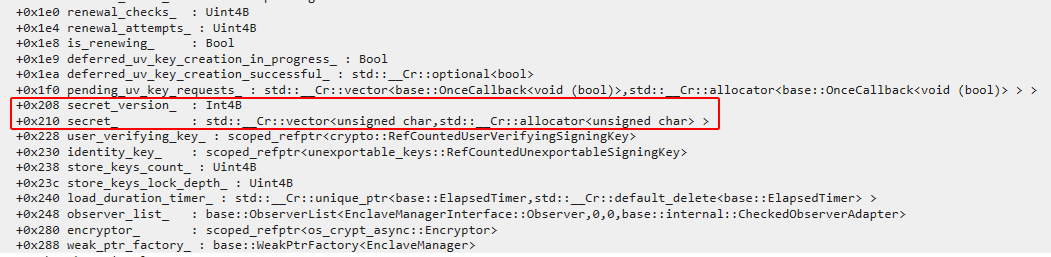 Figure 5: EnclaveManager memory layout.
The output reveals a critical field at offset +0x210. The SDS is stored in the secret_ member, a std::vector<uint8_t> located at offset +0x210 relative to the start of the EnclaveManager object. In the relevant C++ implementation, the vector is represented by three pointers: the beginning of the elements, the end of the elements, and the end of the allocated storage (capacity). Obtaining the address of the EnclaveManager object allows us to locate the secret_ member, from which we can retrieve the pointer to the SDS data.
This structure is confirmed by the Chromium source code, where the secret_ field is defined as a byte vector:
1
2
3
4
5
6
7
8
9
10
11
12
13
// https://chromium.googlesource.com/chromium/src/+/HEAD/chrome/browser/webauthn/enclave_manager.h
// EnclaveManager stores and manages the passkey enclave state.
class EnclaveManager : public KeyedService {
 public:
  ...
 private:
  ...
  // These fields store the security domain secret immediately after a
  // device has been added to the security domain.
  int32_t secret_version_ = -1;
  std::vector<uint8_t> secret_;
  ...
}
5.4 SDS Extraction
To capture the SDS at the moment Chrome handles it, we set a breakpoint on the function that writes to this field. The SetSecret function is called during the onboarding flow:
 Figure 6: Breakpoint on EnclaveManager::SetSecret.
In the source code, the function takes a key version and a span of bytes, and stores them in the class members:
1
2
3
4
5
// https://chromium.googlesource.com/chromium/src/+/HEAD/chrome/browser/webauthn/enclave_manager.cc
void EnclaveManager::SetSecret(int32_t key_version, base::span<const uint8_t> secret) {
  secret_version_ = key_version;
  secret_ = std::vector<uint8_t>(secret.begin(), secret.end());
}
We trigger device onboarding to the security domain by deleting passkey_enclave_state and then using a passkey. WinDbg breaks on the breakpoint.
At the breakpoint on SetSecret, we inspect the registers to identify the this pointer of the EnclaveManager object and the argument containing the SDS. In the Windows x64 calling convention, arguments are passed in RCX, RDX, R8, and R9.
We know that the SDS is stored in the secret_ field at offset +0x210 relative to the start of the EnclaveManager object. We therefore try to read it directly from the this pointer:
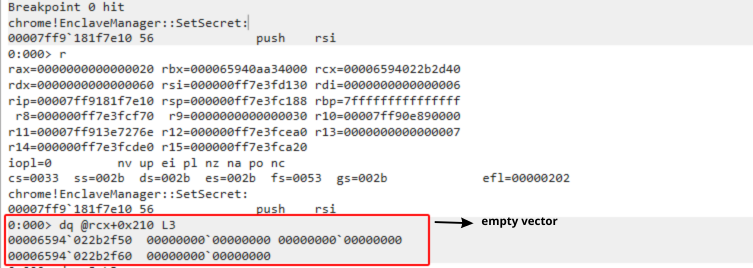 Figure 7: Registers at SetSecret entry (empty vector).
At this precise moment, the secret_ vector is empty. We are at the very beginning of the SetSecret function; the copy has not yet taken place. Direct reading at +0x210 yields nothing.
We then fall back on the argument passed to the function. In Windows x64, the third argument is in R8. Here, he points to the base::span<const uint8_t> parameter containing the pointer to the data and the size:
1
2
3
4
// r8=000000ff7e3fcf70
0:000> dq r8 L3
000000ff`7e3fcf70  00006594`06b7c960 00000000`00000020
000000ff`7e3fcf80  00000000`00000030
We obtain two very interesting values:
0000659406b7c960 : the pointer to the data (the SDS).
0000000000000020 : the size = 32 bytes !
It is now possible to display the 32 bytes of the SDS:
 Figure 8: SDS pointer and size extraction.
5.5 Confirmation of the Security Domain Secret
The elements gathered so far already strongly indicate that this is the SDS. To confirm that this buffer is indeed used by Chrome in the wrapping request construction flow, we set memory access breakpoints on the 32 extracted bytes.
Hardware constraint: an x86/x64 processor only has 4 debug registers (DR0 to DR3), which limits the number of simultaneous hardware breakpoints. Moreover, an access breakpoint can only monitor 8 bytes at a time at most. We therefore split the SDS into 4 blocks of 8 bytes to cover all 32 bytes.
| Breakpoint | Watched address | Covered bytes |
|---|---|---|
ba r8 0000659406b7c960 | 0000659406b7c960 | Bytes 0 to 7 of the SDS |
ba r8 0000659406b7c968 | 0000659406b7c968 | Bytes 8 to 15 of the SDS |
ba r8 0000659406b7c970 | 0000659406b7c970 | Bytes 16 to 23 of the SDS |
ba r8 0000659406b7c978 | 0000659406b7c978 | Bytes 24 to 31 of the SDS |
We first remove the breakpoint on SetSecret, then place the 4 read/write access breakpoints on the 4 blocks of 8 bytes:
1
2
3
4
5
6
7
8
9
0:000> ba r8 0000659406b7c960
0:000> ba r8 0000659406b7c968
0:000> ba r8 0000659406b7c970
0:000> ba r8 0000659406b7c978
0:000> bl
     0 e Disable Clear  00006594`06b7c960 r 8 0001 (0001)  0:****
     1 e Disable Clear  00006594`06b7c968 r 8 0001 (0001)  0:****
     2 e Disable Clear  00006594`06b7c970 r 8 0001 (0001)  0:****
     3 e Disable Clear  00006594`06b7c978 r 8 0001 (0001)  0:****
We release the process so it continues its execution; as soon as Chrome reads or writes to these 32 bytes, WinDbg freezes. We inspect the call stack to identify the context:
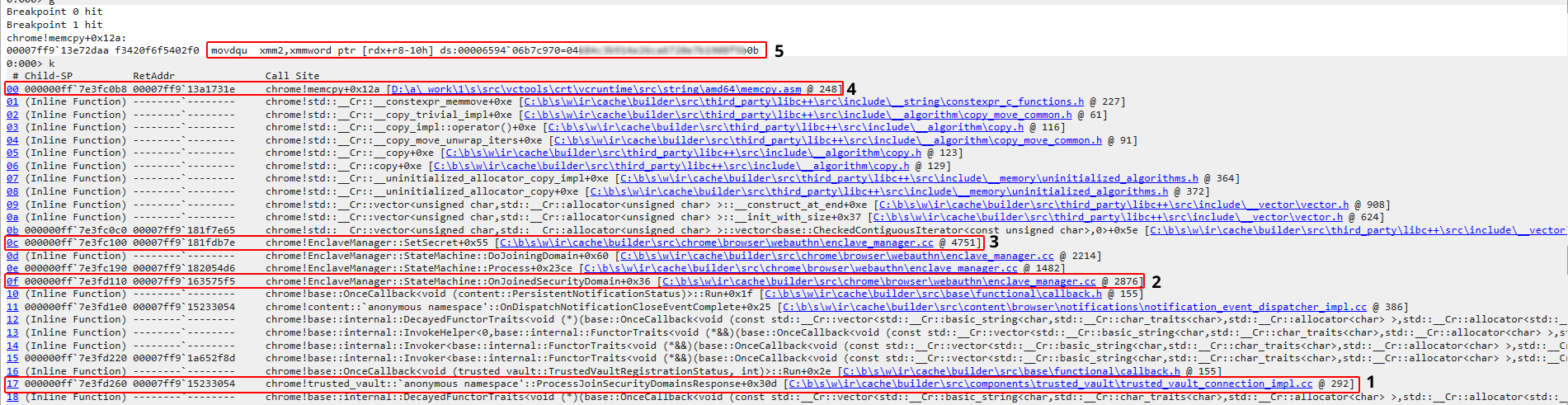 Figure 9: memcpy call stack reading the SDS. (Click to zoom)
Stack analysis:
- Frame 17 (
ProcessJoinSecurityDomainsResponse) shows that Chrome has just received the server response to join the security domain. - Frame 0f (
OnJoinedSecurityDomain) confirms that the domain was successfully joined. - Frame 0c (
SetSecret) is the function that stores the secret. - Frames 0b and 00 show that the vector is being constructed and that memcpy is copying the data.
WinDbg freezes on the breakpoint, the intercepted instruction is:
movdqu xmm2,xmmword ptr [rdx+r8-10h] ds:0000659406b7c970=04[...]b0
The displayed bytes correspond exactly to the second half of the SDS. Chrome reads the SDS to copy it via memcpy into the secret_ vector at offset +0x210, which will contain the SDS, whereas it was empty before this call.
This call path is consistent with the Chromium source code, where ProcessJoinSecurityDomainsResponse processes the server response to join the security domain:
1
2
3
4
5
6
7
8
9
// https://chromium.googlesource.com/chromium/src/+/HEAD/components/trusted_vault/trusted_vault_connection_impl.cc
void ProcessJoinSecurityDomainsResponse(
    TrustedVaultConnectionImpl::JoinSecurityDomainsCallback callback,
    TrustedVaultRequest::HttpStatus http_status,
    const std::string& response_body) {
  ...
  std::move(callback).Run(TrustedVaultRegistrationStatus::kSuccess, last_key_version);
  ...
}
The extracted 32-byte buffer is indeed the SDS, it is the value that Chrome receives from the Cloud Authenticator via the Trusted Vault when it attempts to join the security domain, and then copies into EnclaveManager::secret_.
6. SDS extraction from Chrome memory
This step is the most complex and decisive of the attack. Once the SDS is obtained in plaintext, the objective is to understand how it is stored in memory by Chrome in order to identify generic patterns allowing it to be extracted on any machine, without knowing its value in advance.
6.1 Initial attempts and limitations
Google VRP reports and Unit 42’s analysis indicate that the SDS was exposed in plaintext in a JSON string
"key": "h'<SDS>'" within the chrome://device-log interface, as well as in Chrome’s memory. This extraction method was relevant before Google’s fix. Since the patch, this approach is inoperative (see figure 4). The SDS no longer appears in the logs, but remains present in memory under other structures, notably in Windows-specific heap buffers:
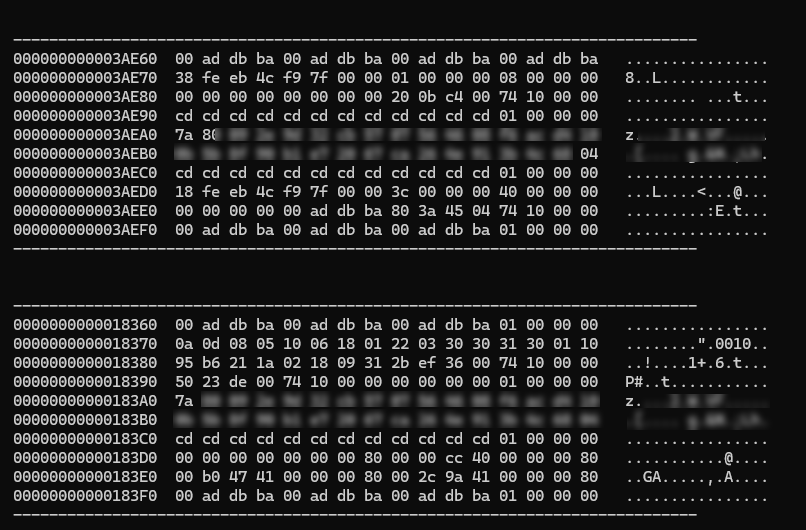 Figure 10: Windows heap fill noise.
These byte sequences (e.g., 0xCDCDCDCD, 0xBAADF00D) are Windows-specific heap fill patterns. The problem is that they contain a huge amount of data unrelated to the SDS, including other high-entropy cryptographic keys stored in identical structures. Even by applying advanced filters (Shannon entropy, number of unique bytes, proportion of printable bytes, etc.), it is impossible to reliably isolate the SDS in this noisy context.
6.2 Chosen approach: CBOR patterns
During onboarding, Chrome communicates with the Cloud Authenticator via a TCP WebSocket connection to enclave.ua5v.com, using the Noise_NK_P256_AESGCM_SHA256 channel. The SDS, received in plaintext from the Trusted Vault, is included in the outgoing CBOR requests sent to the Cloud Authenticator. These requests are encrypted in transit, but the SDS remains in plaintext in the Chrome process memory during their construction.
There is therefore a window of about 3.4 seconds between the TCP connection and the definitive release of the SDS, during which it transits in plaintext through ephemeral CBOR buffers.
The flow timeline is as follows:
| Time | Event |
|---|---|
| — | Creation of the passkey_enclave_state file |
T+~0 ms | TCP connection to enclave.ua5v.com |
T+~78 ms | First copy of the SDS in memory (heap/windows) |
T+~1109 ms | CBOR keys/wrap containing the SDS in plaintext → capture |
T+~3062 ms | CBOR passkeys/assert (or passkeys/create) containing the SDS in plaintext → capture |
T+~3.4 s | Release of all copies of the SDS |
T+~4.5-6.5 s | Signature of the WebAuthn assertion by Chrome with the passkey private key decrypted via the SDS, then transmits it to the RP via the WebAuthn API. |
The creation of the passkey_enclave_state file systematically precedes the establishment of the TCP connection to the enclave.
These two signals constitute 100% reliable architectural triggers: the file materializes the local preparation of the device, by generating the TPM-bound identity key wrapped_identity_private_key with joined = false at that time, and not its effective membership in the security domain.
The TCP connection signals the opening of a session with the enclave. Membership is finalized during this session: Chrome first retrieves the SDS from the Trusted Vault, then onboards to the enclave via the CBOR keys/wrap request, and updates the passkey_enclave_state file by storing the newly wrapped SDS inside the wrapped_security_domain_secrets map, and setting the device identity key to joined = true, thus marking the device’s membership in the security domain. However, the SDS only begins to transit in plaintext in the Chrome process memory after the establishment of this TCP connection.
To capture the SDS under its CBOR patterns, it is therefore necessary to:
- Delete the
passkey_enclave_statefile. - Monitor the creation of the file or TCP connections to
enclave.ua5v.com. - Upon detection, scan the
MEM_PRIVATE+PAGE_READWRITEmemory regions of the main Chrome process (where CBOR buffers are constructed before being sent to the enclave). - Use a multi-threaded scan to traverse memory faster to have a safety margin.
- This method makes it possible to fall upon three CBOR variants in which the SDS transits.
7. The three universal CBOR patterns
Three generic CBOR patterns were identified in the Chrome process memory, each representing a specific action: onboarding, authentication, and registration. The following sections detail these three universal patterns.
7.1 Pattern 1 — keys/wrap (onboarding)
Constructed by BuildSecretWrappingEnclaveRequest in webauthn/enclave_manager.cc.
1
2
3
81 a3 63 63 6d 64 69 6b 65 79 73 2f 77 72 61 70 63 6b 65 79 58 20
[SDS 32 bytes]
67 70 75 72 70 6f 73 65 76 73 65 63 75 72 69 74 79 20 64 6f 6d 61 69 6e 20 73 65 63 72 65 74
JSON equivalent:
1
{"cmd": "keys/wrap", "key": "<SDS>", "purpose": "security domain secret"}
This request is used during device onboarding. Chrome wraps the SDS to send it to the Cloud Authenticator.
7.2 Pattern 2 — passkeys/assert (passkey use)
Constructed by BuildGetAssertionCommand in enclave/enclave_protocol_utils.cc.
1
2
3
81 a5 63 63 6d 64 6f 70 61 73 73 6b 65 79 73 2f 61 73 73 65 72 74 66 73 65 63 72 65 74 58 20
[SDS 32 bytes]
67 72 65 71 75 65 73 74 a1 64 72 70 49 64
JSON equivalent:
1
{"cmd": "passkeys/assert", "secret": "<SDS>", "request": {"rpId": "<domain>"}}
This request is generated when using a passkey. The SDS is used to sign the WebAuthn assertion.
7.3 Pattern 3 — passkeys/create (passkey creation)
Constructed by BuildMakeCredentialCommand in enclave/enclave_protocol_utils.cc.
1
2
3
81 a5 63 63 6d 64 6f 70 61 73 73 6b 65 79 73 2f 63 72 65 61 74 65 66 73 65 63 72 65 74 58 20
[SDS 32 bytes]
67 72 65 71 75 65 73 74 a3 62 72 70 a2 62 69 64
JSON equivalent:
1
{"cmd":"passkeys/create","secret":"<SDS>","request":{"rp":{"id":"<domain>","name":"<domain>"}}}
This request is generated when creating a passkey. The SDS is used to encrypt the new private key before its synchronization.
8. SDS memory lifecycle
A precise measurement of the SDS persistence was carried out. Here is the result of a complete run:
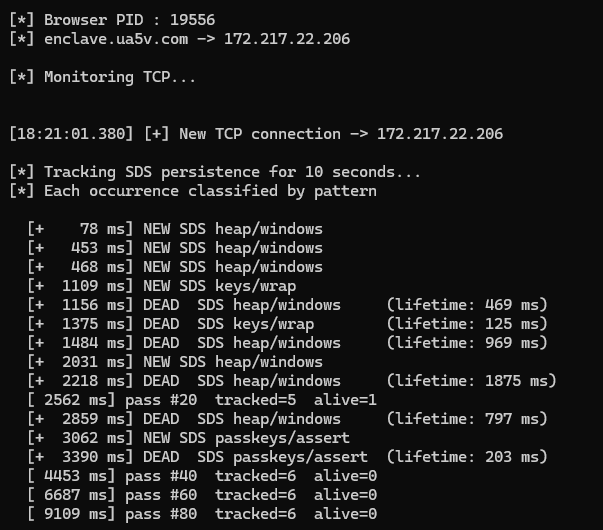 Figure 11: SDS memory persistence timeline.
| Pattern | First seen | Last seen | Lifetime | Interpretation |
|---|---|---|---|---|
heap/windows | +78 ms | +1953 ms | 1875 ms | Common Windows temporary buffer |
heap/windows | +453 ms | +1422 ms | 969 ms | Common Windows temporary buffer |
heap/windows | +468 ms | +937 ms | 469 ms | Common Windows temporary buffer |
keys/wrap | +1109 ms | +1234 ms | 125 ms | Ephemeral onboarding CBOR buffer |
heap/windows | +2031 ms | +2828 ms | 797 ms | Common Windows temporary buffer |
passkeys/assert | +3062 ms | +3265 ms | 203 ms | Ephemeral assertion CBOR buffer |
The targeted CBOR buffers containing the SDS live between 125 and 203 ms, which is extremely short. They are only exposed for ~330 ms in total, spread over a window of ~2.2 seconds after the TCP trigger. A high-frequency multi-threaded scan is used to provide a safety margin to capture these ephemeral windows with a 100% success rate.
Once the three CBOR patterns are identified, it becomes possible to extract the SDS during this window without knowing its value. This is the core of the attack and the ultimate goal of this entire chain.
9. PoC Demonstration
You can find the PoC implementation, covering the extraction of the SDS from Chrome memory.
The PoC was validated on a Windows machine equipped with a TPM (Trusted Platform Module). The attack was successfully reproduced across all current Chrome release channels: Chrome Stable 156, Chrome Dev 158, Chrome Beta 156, and Chrome Canary 158.
Because this vulnerability exploits an architectural flaw rather than a specific implementation bug, it is not tied to a specific Chrome version. Consequently, all versions of Chrome are vulnerable.
Figure 12: PoC Demonstration: SDS Extraction via sds_extractor.
10. Google’s position and contradictions
Google considers this type of attack outside its threat model under the heading of physically local attacks: if malware is already executing on the victim’s machine, it is considered already compromised, and Chrome cannot offer any additional guarantees. Chrome nevertheless deploys active protections in parallel against these same attacks, such as App-Bound Encryption for Chrome credentials, which immediately reveals the limits of this argument. In fact, Google has consistently assigned CVEs to physically local attacks requiring malware, such as CVE-2025-12910, CVE-2025-12439, CVE-2026-13914, CVE-2026-12444…
As mentioned above, the timeline of disclosures and Google’s responses shows a striking inconsistency:
- End of July 2025: A first researcher reported a leak of the SDS in Chrome logs. Google took the report very seriously, patched it in 24 hours, and assigned CVE-2025-12910.
- End of November 2025 (4 months later): Arie Olshtein from Unit 42 reported exactly the same vulnerability as the first, but under a different parameter. Google patched again urgently, but this time refused to assign a CVE, invoking the threat model.
The researcher himself highlighted the inconsistency in comment #6 of the report:
“Since Google previously assigned a CVE for the same type of exposure (CVE-2025-12910), I would appreciate being notified if this report will later receive a CVE identifier.”
The report was then closed, it never obtained a response or a CVE.
The contradiction is all the more glaring as it appears in the same discussion thread:
- Comment #2: A Google engineer closes the report invoking physically local attacks.
- Comment #3: Another engineer from the team immediately contradicts him:
“No, this is an oversight. The security domain secret is pretty sensitive and we try to keep it out of logs.”
before urgently patching it 24 hours later.
This means that in practice, the threat model argument only served to refuse the CVE, not to refuse the fix. This is proof that the decision is not technical but purely political: the problem is fixed but they refuse to officially recognize it as a vulnerability.
Even more troubling: in December 2025, just after refusing the CVE, Google retroactively goes back to the first report (the one to which a CVE had been assigned) to add that the problem is “outside our threat model and really shouldn’t be classified as a vulnerability”. A bug patched urgently, rewarded with a CVE, reclassified months later as out of scope.
The paradox is also documented independently. Researchers from Island.io compiled a list of Chromium issues closed with a link to the Security FAQ, showing a massive increase in cases classified as “outside threat model” in recent years.
11. Conclusion
This analysis concerns a new variant of the Golden Pass-ta-key attack, more critical than the previous one. Unlike the first variant which exploited a leak of the SDS in Chrome logs, this second variant exploits the mechanism itself: the construction of CBOR requests sent to the Cloud Authenticator. This leak is structurally inevitable as long as Google does not rethink the client-side architecture.
Malware with standard user privileges can therefore trigger a device onboarding to the enclave security domain and exfiltrate the SDS by monitoring TCP traffic to enclave.ua5v.com or the creation of the passkey_enclave_state file, as well as the WebauthnCredentialSpecifics records stored by Chrome. For their part, offline, the attacker can decrypt the ECDSA private keys of GPM passkeys, then sign valid WebAuthn assertions themselves for each of the concerned services.
Google’s fixes only removed an ancillary exposure; the core problem persists. As long as this mechanism remains unchanged, the attack will remain reproducible.
The logical continuation of this analysis; the complete exploitation of the chain, from the extracted SDS to account takeover, will be the subject of Part 2. We will detail there the decryption of the ECDSA private keys of GPM passkeys stored in the WebauthnCredentialSpecifics records, the forging of WebAuthn assertions, and the demonstration of a complete ATO on an account protected by GPM.